
What are you looking for?
Filter by Category
Filter by Tags
- angular
- application
- bluetooth
- cinnamon-desktop
- cloud
- cloudflare-tunnel
- cloudflared
- cloudinit
- cockpit
- cPanel
- cron
- database-administration
- debian
- debian-12
- docker
- easydcim
- fedora
- fedora-41
- fedora-42
- fedora-43
- fedora-kde
- fnm
- fonts
- gnome-desktop-environment
- gnome-shell
- google-chrome
- hibernate
- hidpi
- intel-igpu
- ionic
- kde-neon
- kde-plasma-6
- kdeneon
- kvm-qemu
- libvirt
- linux
- linux-kernel
- linuxmint
- lxqt
- mariadb
- mysql
- networking
- nodejs
- nvidia-wayland
- PHP
- pnpm
- portainer
- powershell
- proxmox-ve
- robocopy
- rsync
- shell-scripting
- sudo
- sveltekit
- swap
- tailwindcss
- tigervnc
- ubuntu
- udev
- usb
- virtualbox
- virtualbox-guest-additions
- vnc
- vscode
- wayland
- WHM
- WHMCS
- winget
Author: Shahriar Shovon
-
How to Set a Default Scaling Factor on Ubuntu Desktop
Read: How to Set a Default Scaling Factor on Ubuntu DesktopI have a HiDPI monitor. So, I need to scale the Ubuntu Desktop VM to 200% from the Display settings. But every time I do that and change the display size of the VM, the scaling is automatically reset to 100%. I don’t want that to happen. I found a…
-

How to Fix GitLab Push Issue Due to Permissions Error
Read: How to Fix GitLab Push Issue Due to Permissions ErrorAfter migrating GitLab to a new server, GitLab users may not be able to push changes to their GitLab repository due to permission error. You can fix this by using the following command:
-
How to Open the Old Windows Control Panel Network Connections Manager
Read: How to Open the Old Windows Control Panel Network Connections ManagerTo configure/manage network adapters, the old Control Panel Network Connections Manager app is really helpful. In this article, I am going to show you how to open it on Windows 11. First, press Windows + R to open Run window, type in ncpa.cpl, and press Enter. The Control Panel >…
-
How to Create a Ubuntu Cloud VM Template on Proxmox VE
Read: How to Create a Ubuntu Cloud VM Template on Proxmox VECreate a Linux template VM on Proxmox VE. Download the Ubuntu Cloud image to Proxmox VE Resize the cloud image to 20G Add the cloud image as disk to the template VM Enable Snippets in the local storage and create a snippet file in the path /var/lib/vz/snippets/vendor.yaml The same configuration…
-
How to Set a Default Scaling Factor on Linux Mint
Read: How to Set a Default Scaling Factor on Linux MintI have set the Display > Layout > User interface scale to 200% on Linux Mint Cinnamon desktop environment installed as a VirtualBox virtual machine (VM). But every time I restart the VM, the user interface scale automatically changes back to 100%. I don’t want that to happen. I want…
-
How to Enable Auto Login on Linux Mint
Read: How to Enable Auto Login on Linux MintIn this article, I am going to show you how to enable automatic login to your Linux Mint Cinnamon desktop environment. First, find your login username with the following command: Open the Login Window app from the Linux Mint Start Menu. The Login Window app should be opened. Navigate to…
-
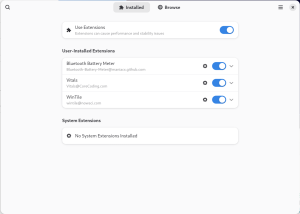
Important GNOME Shell Extensions for GNOME Desktop Environment
Read: Important GNOME Shell Extensions for GNOME Desktop EnvironmentIn this article, I will list all the GNOME shell extensions that I use on my laptop. Bluetooth Battery Meter This extension is used to display the available battery percentage of connected Bluetooth devices on the GNOME system tray or panel. WinTile This extension enables Windows 11 like tiling window…
-
How to Configure WiFi Network Interface on Proxmox VE Host
Read: How to Configure WiFi Network Interface on Proxmox VE HostIn this article, I am going to show you how to configure WiFi network on Proxmox VE host. Installing Required Tools To configure WiFi network interface on Proxmox VE, you need to install the wpasupplicant and isc-dhcp-client programs installed on your Proxmox VE host. You can install those programs on…
-
How to Copy Files from Proxmox VE LXC Container to Proxmox Host
Read: How to Copy Files from Proxmox VE LXC Container to Proxmox HostYou can use the pct command on the Proxmox VE host to copy files between LXC containers and your Proxmox VE host. Copying a File from LXC Container to Proxmox Host To copy a file /root/gitea.tar.gz from the LXC container ID 203 to your Proxmox VE host and put it…
-
How to Configure Keycloak SSO for Proxmox VE
Read: How to Configure Keycloak SSO for Proxmox VECreating a Keycloak OpenID Client To configure Keycloak SSO for Proxmox VE, you need to create a Keycloak OpenID client with the following settings: General Settings: Client type: OpenID Connect Client ID: Proxmox Name: Proxmox Description: Proxmox VE OpenID Authentication Capability config: Client authentication: On Authentication flow: Standard flow Login…